
Coming to marketOn the market
--
DAYS
--
HRS
--
MIN
--
SEC
October 30, 2026 · 12:00 PM CET
Editor Pro
xTdC
ONMAKE applications

ONMAKE APP

Software for people who work with documents, calculations and data that have to hold up under review. Every app shows how it gets to the result, and produces real files that open outside ONMAKE too.

Every step in plain sightFormulas, substituted values and criteria stay visible, so the result can be traced and explained.
Real filesHTML, PDF and Word stay real, openable formats, not locked containers.
One accountThe same ONMAKE account for every app, with your data protected in the database.

The first four

Ready for your work

Save AI answers, write and lay out documents, sign your emails, capture web pages: four apps you can use right away.

ONMAKE apps are offered under the laws of the European Union.


In the coming days also in the United States, Canada and other countries.

Completely free

ONMAKE Editor HTML

Writing and page layout

Available from October 8, 2026

FreeNo limit on documents, and they stay on your device. Works with your AI agent too.

Paged documents, like a word processor, but in real HTML.

  • Page-based documents in A4, A3 or US Letter
  • Text, images, tables, styles, headers and footers
  • Code view in seven languages
  • Track changes and comments inside the document
  • Print and export to PDF, exactly as laid out
  • The file stays an HTML file that opens anywhere
Explore Editor HTML →

OnFirma

Email signatures

Available from October 8, 2026

FreeOne signature template is free.

Enter your details once: they become an email signature, a digital business card and a QR code.

  • An email signature that updates as you type: copy it and paste it into your mail
  • A digital business card that always stays up to date
  • QR code: whoever scans it saves your contact
  • The whole office with the same signature
Explore OnFirma →
AS

ONMAKE AI Save

Browser extension

Available from October 8, 2026

Install it from the Chrome Web StoreAvailable in the Chrome Web Store

Free5 saves a day for free, unlimited with a plan.

Every AI answer becomes a file.

  • Six buttons above every answer: PDF, DOC, XLS, CSV, HTML, MD
  • Works on ChatGPT, Claude, Gemini and 5 more AI sites
  • Save one answer, a selection or the whole chat
Learn more →
PR

ONMAKE PageRoll

Browser extension

Available from October 8, 2026

Install it from the Chrome Web StoreAvailable in the Chrome Web Store

Free5 saves a day for free, unlimited with a plan.

The web page you need, without everything else.

  • Removes ads, banners, cookie notices and menus: every removal can be undone
  • Full page or just what you see, as PDF, PNG or JPEG
  • Clean page as PDF, Word or Markdown, or printed on A4, A3 or Letter
  • Works with your ONMAKE account
Learn more →

Coming soon

The next ONMAKE apps

Documents, mathematics, conversions, coordination of multiple AIs. Each app does one thing and does it completely.

ONMAKE Editor Pro

HTML and native PDF

Edit what’s actually in the PDF, not a patch on top of it.

  • Text, images, tables, styles, headers and footers
  • Code view in seven languages
  • The file stays an HTML file that opens anywhere
  • Editing of PDF text, images, pages and vectors
  • Opens Word, ODT and RTF, and takes them back to Word
  • Removed text is taken out of the file’s objects, not covered over
  • Signatures, pen and notepad inside the document

Available from October 30, 2026, 12:00 PM

€6.90/month or €69/year, VAT included

Open Editor ProChoose your plan
Explore Editor Pro →

ONMAKE Editor Ultra

Coming soon

HTML and PDF documents, in one app.

  • Text, images, tables, styles, headers and footers
  • Code view in seven languages
  • The file stays an HTML that opens anywhere
  • Edit PDF text, images, pages and vectors
  • Imports Word, ODT and RTF, and exports back to Word
  • Removed text is taken out of the file objects, not covered
  • Signatures, pen and notepad inside the document
Discover Editor Ultra →

xTdC

Structural calculation

Not a number. A reconstructible path.

  • Structural calculation to NTC 2018 and Eurocode
  • Formulas, numeric substitutions, results and outcome always visible
  • Load analysis with ULS and SLS combinations
  • Snow, wind and thermal actions calculated step by step
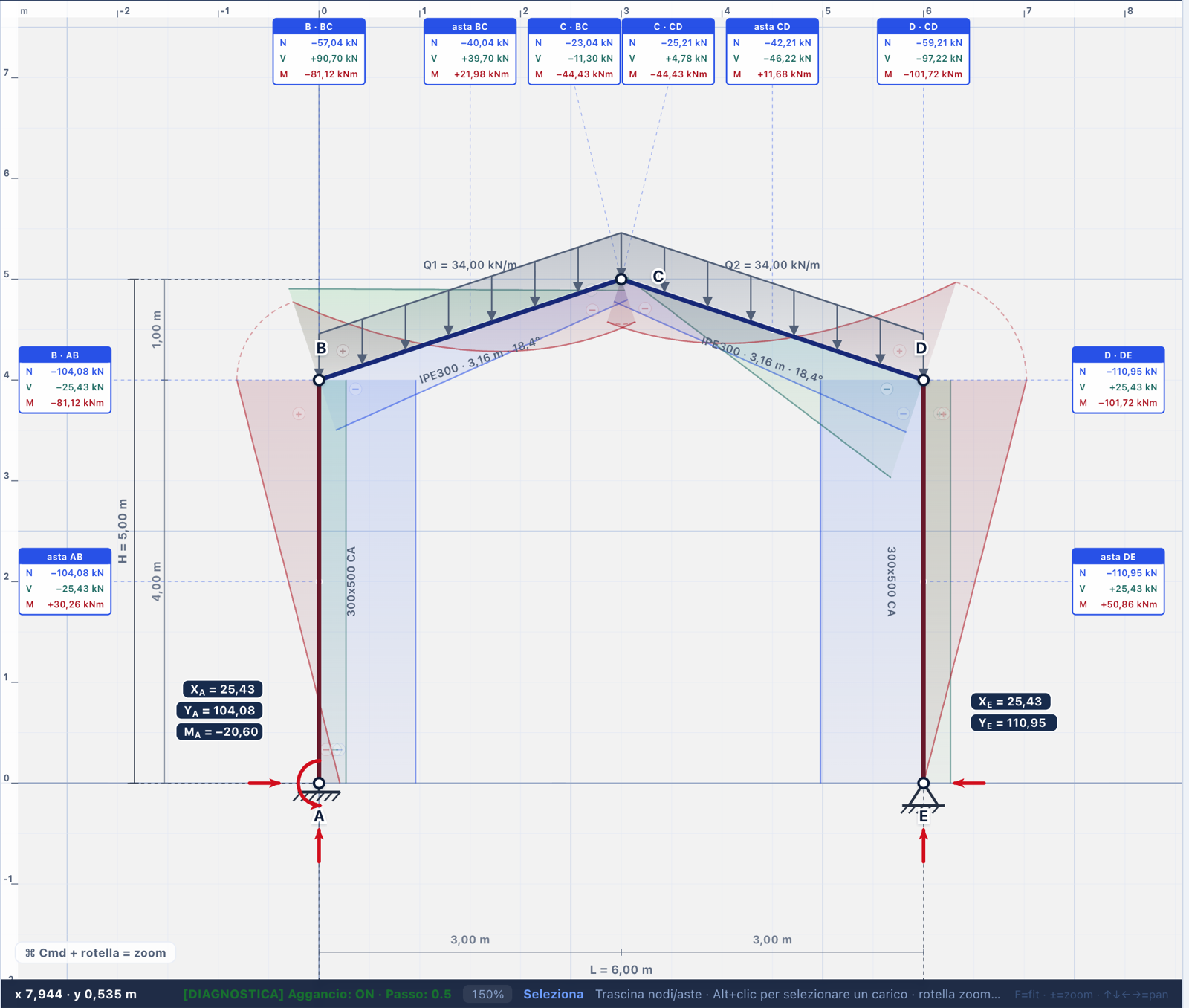
  • Static schemes, reactions and N, V, M diagrams
  • Checks of steel and reinforced concrete members
  • Technical reports built directly from the calculations

Available from October 30, 2026, 12:00 PM

€7.90/month or €79/year · Students €3.95/month or €39.50/year · VAT included

Open xTdCChoose your plan
Explore xTdC →

ONMAKE xMath

Math

The answer, and every step it took to get there.

  • Symbolic and numeric calculation with every step shown
  • Derivatives, integrals, equations and limits
  • Function analysis, including two variables
  • 2D and 3D plots of the results
  • Formula editor in LaTeX and MathML
  • Live formulas in ONMAKE Editor, editable and recalculable
  • One ONMAKE account across the whole suite
Explore xMath →
OC

ONMAKE Octans

Accounting and tax · Coming soon

A business’s books, done every day.

  • Bookkeeping, VAT, collections, filings and financial statements
  • E-invoices from SDI, with no manual upload
  • Linked accounts with payments matched to invoices
  • F24, VAT settlements and returns in the official format
  • Calculated to the cent, two independent paths and full balancing
  • Every difference stopped and explained, you approve
  • Works through proxies and a licensed professional, within the law
Explore Octans →
LA

LINKALL™

Multi-AI governance

Multiple AI systems at work, one person making the call.

  • Teams of AI agents coordinated on a single objective
  • AIs work in parallel or in sequence and challenge each other
  • Cross-validation and divergence handling
  • Shared memory and a log of every step
  • The decision always stays with a person
  • U.S. Provisional Patent Application No. 63/927,664
Explore LINKALL →
IN

ONMAKE Ink / Pad

Handwriting and drawing · Coming soon

A digital pen for notes, technical sketches and markup.

  • Digital pen for notes, technical sketches and annotations
  • Designed for Apple Pencil on iPad
  • Highlighters, shapes, lasso and layers
  • Grids and technical templates
  • Imports PDFs and images
  • Sends content to the other ONMAKE apps

Featured

Structural calculations you can show

Real screenshots of the application. No illustrations: what you see is what it produces.

xTdC screenshot: two-column frame with sloped roof and internal force diagrams

xTdC

Structural engineering

Structural calculations you can walk your client through, step by step.

  • Every check shows the formula used, the values substituted, the result and the acceptance criterion
  • Technical documentation ready to attach to the project file
  • Built on the Italian building code (NTC 2018): reinforced concrete, steel, load analysis
Who it’s for: engineering firms and professionals who need to explain a calculation, not just hand it over. Great for studying too: engineering and architecture students see every step, from formula to result.
Explore xTdC →
Browser extension

ONMAKE PageRoll

Captures the page you’re viewing and strips out what you don’t need: ads, banners, cookie notices and menus. Then you print it or save it as a PDF.

Every automatic removal is listed and can be undone, so you decide what stays.

No account needed, and the page never leaves your computer. For Chrome and Edge.

Go to the PageRoll page →

Browser extension

ONMAKE AI Save

Saves an AI answer, a whole AI conversation, a web page or a selection in 12 formats: PDF, Word, Excel, CSV, HTML, Markdown, PNG, TXT, JSON, ODT, ODS and EPUB. Four are always one click away; the others are switched on in the options.

Everything happens in the browser: the content is not sent to ONMAKE servers and there is no telemetry. For Chrome, Edge and Brave.

Go to the AI Save page →

Handwriting and drawing · Coming soon

ONMAKE Ink / Pad

Handwriting, drawing and markup with a digital pen: Apple Pencil, highlighters, shapes, lasso, layers, grids and technical templates.

Imports PDFs and images and passes content to the other ONMAKE products.

Designed for iPad first, then the web.

ONMAKE users

Open the ONMAKE apps

The apps run on your ONMAKE account. Access is currently by invitation only: if you received a code, enter it after you sign in.

Open the apps → Sign in or sign up