ONMAKE Editor Pro

Edit the PDFinside, not on top.

ONMAKE Editor Pro is the advanced version of ONMAKE Editor HTML: it includes everything HTML does and adds native PDF editing. Text, images, pages, objects and vectors: changes act on the file’s actual content.

Sign in with your ONMAKE account →Requires an ONMAKE account

What’s new

The latest features

October 3, 2026
  • Verify by country: UBL / Peppol, XRechnung, CII, ZUGFeRD / Factur-X invoices and iXBRL / ESEF statements for the European Union; SEC Inline XBRL filings and UBL invoices for the United States; UBL / Peppol invoices and XBRL for Canada
  • Any other XML shown in a readable form
  • .p7m, .p7s, PAdES (with a warning if the PDF was changed after signing) and XAdES signatures, timestamps, eIDAS qualified signatures with the trusted lists of every EU country and revocation checks
  • Verification report exportable as PDF
  • PDF/A-1b, 2b, 2u and 3b: downloadable only when compliant and verified with veraPDF, with a compliance report
October 2, 2026
  • New Verify section: Italian SDI e-invoices, XBRL financial statements and signed .p7m PDFs, with signature checks
  • In DOC and HTML you can move and edit everything: photos, text and boxes, wherever you want
  • Full right-click menu on the page
  • Header and footer editable right on the page
  • Esc closes everything
  • Font list with preview
  • PDF: organize pages and drag other PDFs exactly where you want them, box selection, highlighter, navigation bar and “All tools”

Verify

Open and check, without touching the file

The Verify section opens documents read-only: the file is never modified. It checks the digital signature and gives you a clear result.

Italy
  • SDI e-invoices (.xml and signed .xml.p7m)
  • InfoCamere XBRL financial statements (.xbrl and .xbrl.p7m)
  • Signed PDF documents (.pdf.p7m), shown as pages
Signature check
  • Document integrity
  • Signer and signing date
  • Certification authority checked against the EU trusted list
  • Green, yellow or red result
European Union
  • UBL / Peppol invoices, XRechnung (Germany), CII
  • ZUGFeRD / Factur-X (Germany, France)
  • iXBRL / ESEF financial statements
United States
  • SEC Inline XBRL filings (10-K, 10-Q) and us-gaap XBRL
  • UBL invoices
Canada
  • UBL / Peppol invoices
  • XBRL
Signatures
  • .p7m and .p7s, signatures inside PDFs (PAdES, with a warning if the PDF was changed after signing) and XML (XAdES)
  • Timestamps and revocation checks
  • eIDAS qualified signatures with the trusted lists of every EU country
  • For the US and Canada: certificate chain validation (there is no qualified-signature list there as in the EU)
Report
  • Green, yellow or red result with the reasons
  • Verification report exportable as PDF
  • Any other XML shown in a readable form

PDF/A

Archive PDFs, compliant and verified

Creates PDF/A-1b, 2b, 2u and 3b: the file can be downloaded only when it is compliant and verified with veraPDF, the reference validator of the PDF Association, together with a compliance report. It also checks PDF/A compliance of any PDF opened in Verify.

Technical verification, not a legal expert opinion.

The principle

Files stay files

Many PDF editors don’t modify the document: they add an annotation on top of it. The “deleted” text stays in the file, and can be recovered with suitable tools. ONMAKE Editor Pro instead acts on the file’s actual content: text, images, pages, objects and vectors, not an overlay.

Annotation on top

The text is covered, not removed

PageProject 40 hours
Reserved discount −4 hours
Total 36 hours
In the file(Project 40 hours) Tj
(Reserved discount −4 hours) Tj
(Total 36 hours) Tj

The rectangle covers the text visually, but the original content stays in the file and can resurface with suitable tools.

Real content changed

The text is gone

PageProject 40 hours
Total 36 hours
In the file(Project 40 hours) Tj
(Total 36 hours) Tj

Text, images or pages that are removed are no longer in the file: they cannot come back visible in any way.

What it adds

Everything in Editor HTML, plus the PDF

ONMAKE Editor Pro starts from the same base as ONMAKE Editor HTML, adds editing of existing PDFs, and opens Word, ODT and RTF documents, taking them back to Word.

Examples

The same document, identical in every version

A real document open in ONMAKE Editor Pro: as a paged document, as an editable PDF, and while building the matching web page.
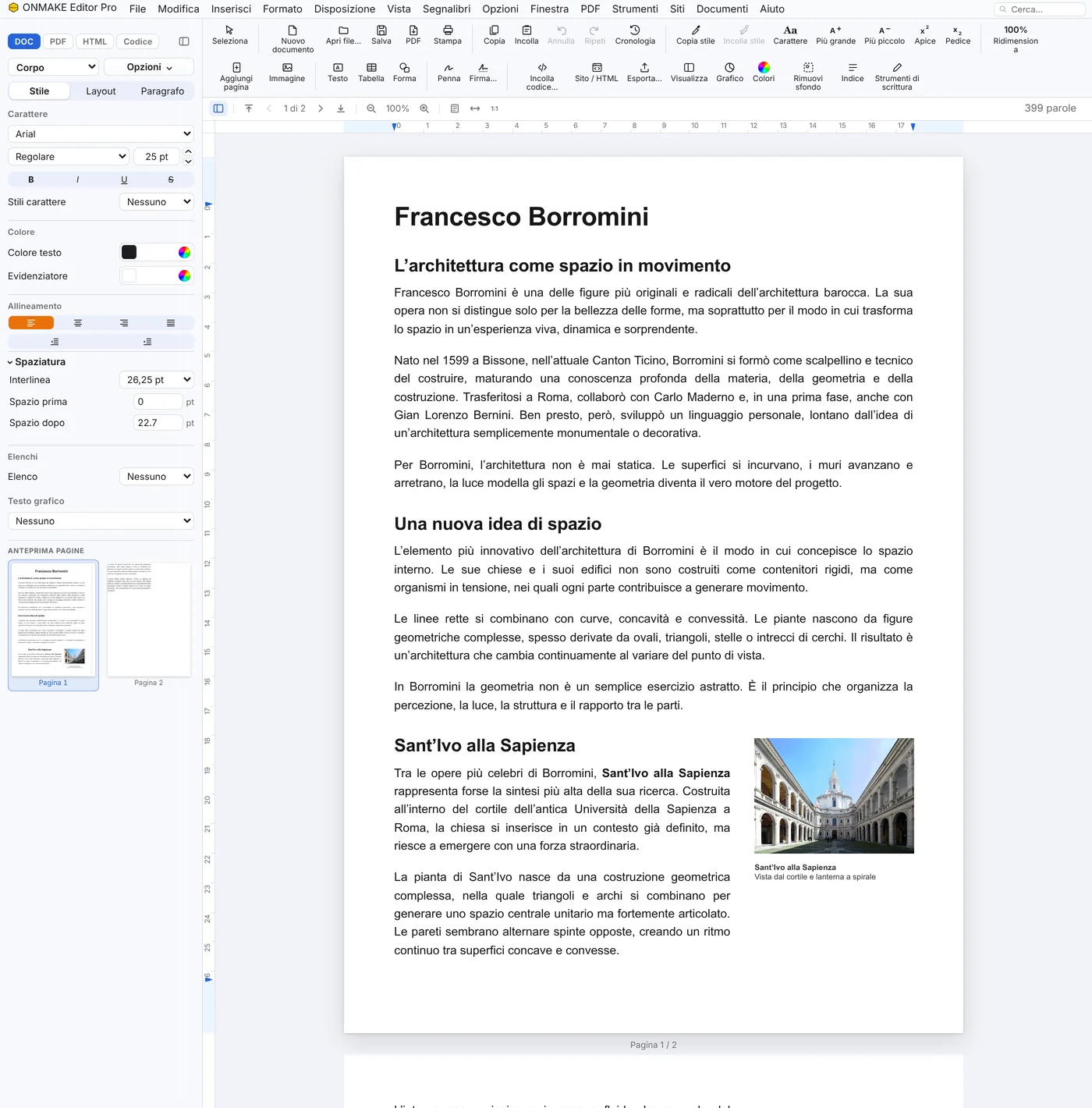
Word view· borromini.docx· Editor Pro 0.37.70
The same page opened as a Word document (.docx): you edit it and save it as Word and PDF
The same page opened as a Word document (.docx): you edit it and save it as Word and PDFSample document · Photo in the document: “Sant'Ivo alla Sapienza -Rome.jpg”, Paris Orlando, CC BY-SA 4.0, Wikimedia Commons.
Code view· borromini.html· Editor Pro 0.37.70
Code view: the document's HTML and the responsive preview, side by side
Code view: the document's HTML and the responsive preview, side by sideSample document · Photo in the document: “Sant'Ivo alla Sapienza -Rome.jpg”, Paris Orlando, CC BY-SA 4.0, Wikimedia Commons.
PDF view· borromini.pdf· Editor Pro 0.37.70
PDF: the same page as a PDF, editable in content
PDF: the same page as a PDF, editable in contentSample document · Photo in the document: “Sant'Ivo alla Sapienza -Rome.jpg”, Paris Orlando, CC BY-SA 4.0, Wikimedia Commons.

Sample documents.

The family

Editors that work the same way

Start with Editor HTML; Editor Pro adds the PDF. A document moves from one editor to another without losing anything: whatever an editor doesn’t handle, it keeps.

Account

One ONMAKE account, valid across the whole suite

ONMAKE Editor Pro requires registration: documents stay tied to your ONMAKE account, the same account that also works for OnFirma and xTdC. No separate profile is needed for each product.

How to open it

ONMAKE Editor Pro opens from ONMAKE APP with your ONMAKE account.