 ONMAKE Gear
The right model at the right moment for the task at hand, with effort matched to the task: excellent work, optimised tokens, always leaning to saving, with excellent quality.
MIT license · github.com/MaxTulli70/ONMAKE.Gear
How it works
At the start of every Claude Code session, ONMAKE Gear gives the session a rule:
STATO.md per job (decided, done, missing, files touched), to read at the start of a session instead of the whole conversation;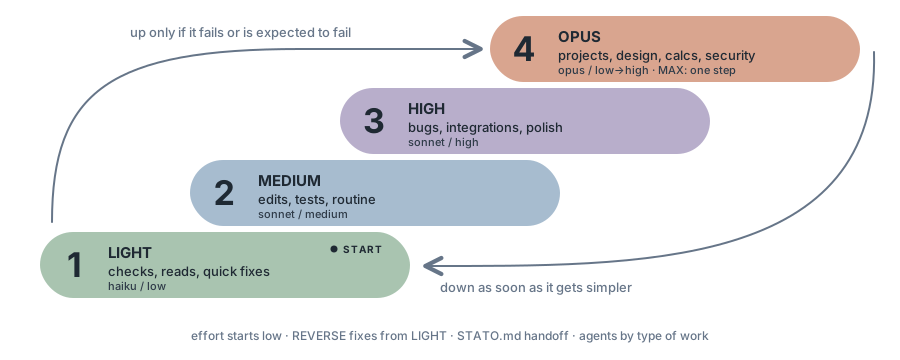
Levels and agents
The type of work picks the model; effort starts low whenever the job can be done that way and goes up only when the check fails. Projects (design, architecture, a new interface) start directly at OPUS. REVERSE fixes errors starting from LIGHT.
gear-readerreads, search, statusgear-testertests and checksgear-editorknown files and linesgear-writertexts, documentationgear-debuggerunknown bugsgear-reviewercode reviewgear-designerinterfacesgear-architectprojectsgear-standardsstandards, starts at mediumgear-securitysecurity, starts at mediumgear-maxthe single peak stepThe chat decides, phase by phase, which model suits the work and can hand a phase to the matching gear agent; this is a suggestion to the chat, not an obligation.
Bar and panel
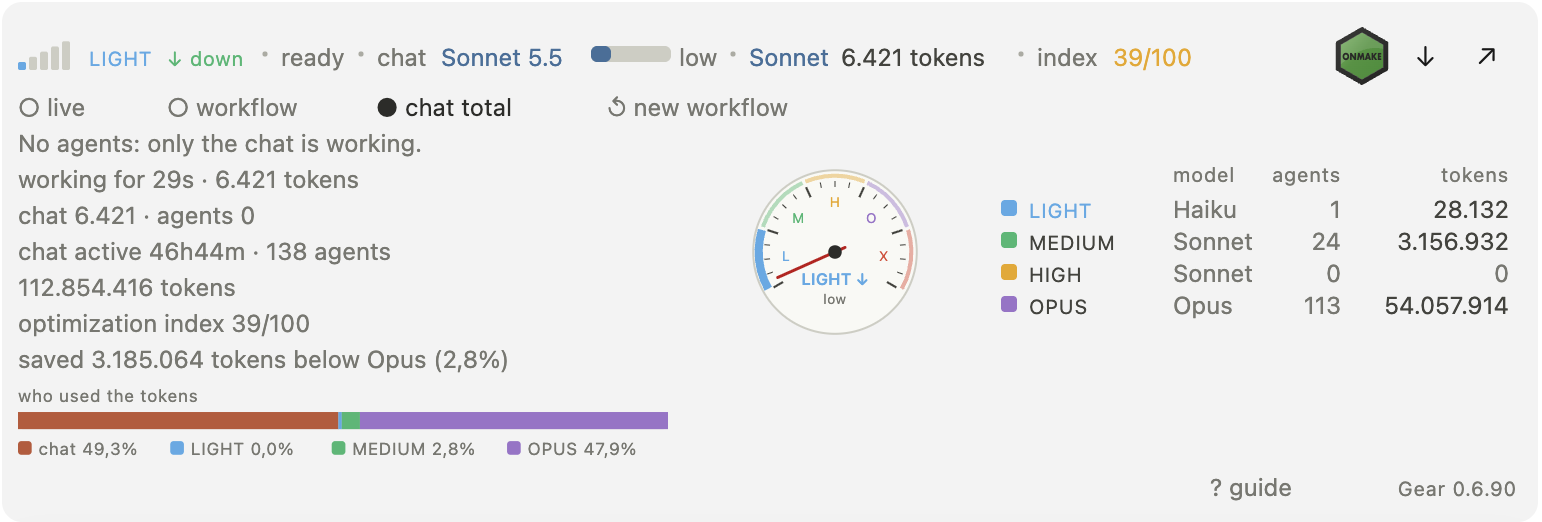
In Claude Code a bar above the prompt shows, in the main row (desktop):

The bar above the prompt
The HTML panel in the browser
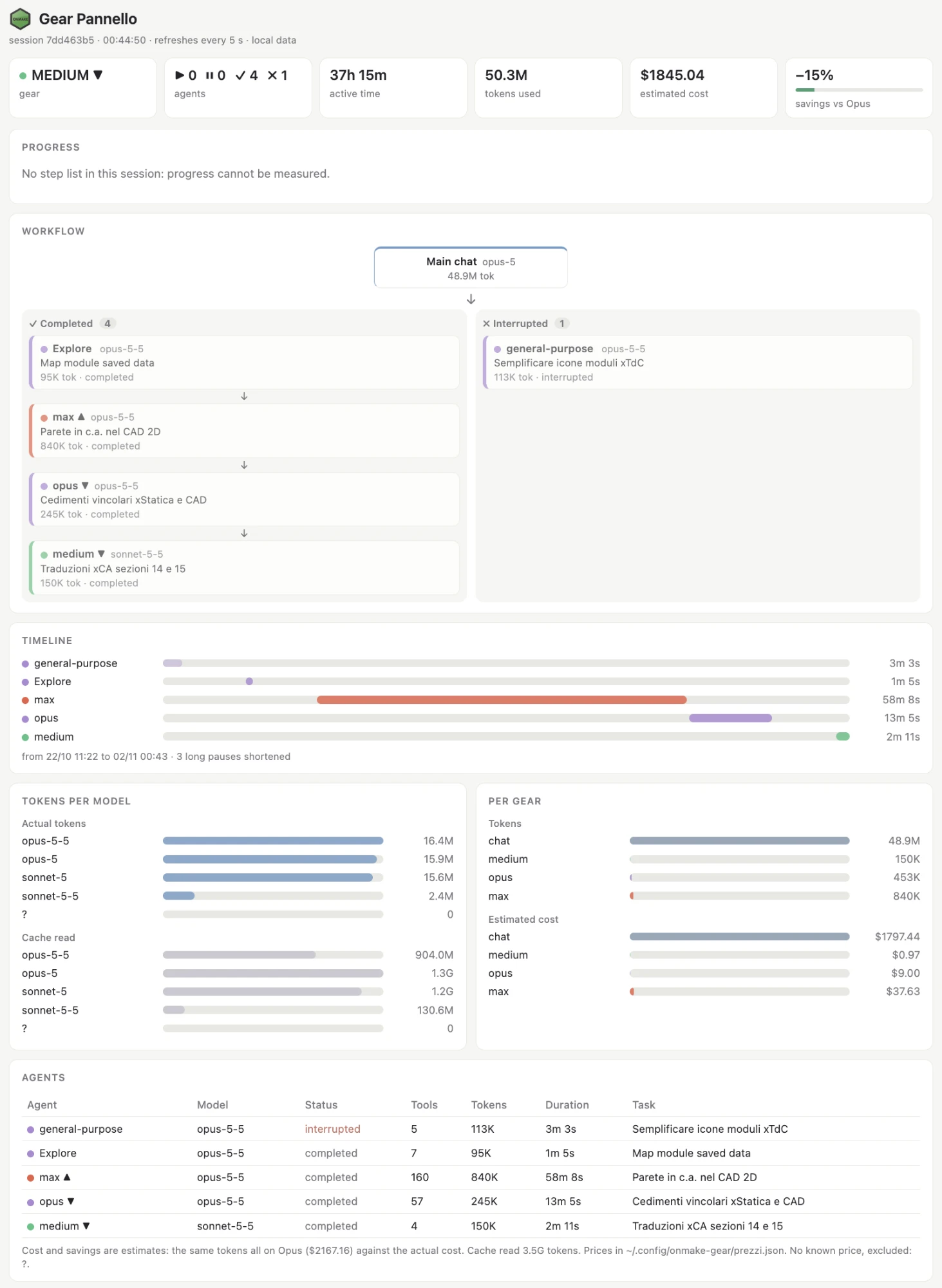
The full panel of a session: gear, agents, active time, tokens, estimated cost and savings versus Opus, progress, workflow, timeline, tokens per model and per gear, agents table.
The ONMAKE logo opens onmake.it; the arrow opens the dropdown; ↗ opens the HTML panel in the browser.
The dropdown has three views: live (from the start of the current turn), workflow (from the saved reset) and total chat (the whole chat). It holds the speedometer and a dial with zones L M H O X, with a needle that follows gear and effort (4 effort steps per gear).
It goes from 0 to 100. Weights: agents light 1, medium 2, high 3, opus 5; chat Haiku 1, Sonnet 2, other 5. Green from 50, yellow from 20. Savings shows the tokens done by light, medium and high agents with their percent of the total.
Data refreshes at most every 8 seconds and is read from the local transcripts, with no network. Guide languages: Italian (default), English, German, French, Spanish.
More tools
Shows the current gear, for example ⚙ LIGHT ▼ (the arrow is the last shift up or down). In the terminal, enable it in settings.json with statusLine.
Prints tokens per model and per gear level, with python3 standard library only. Sub-agents are counted separately and the main chat is shown as one row.
For opencode, DeepSeek Harness (dsh), Codex, Gemini and Cursor, a compact rule block is added to their instruction files, with backup, safe to re-run and removable with one command.
Install
Copy the two commands into the terminal.
$ claude plugin marketplace add MaxTulli70/ONMAKE.Gear
$ claude plugin install onmake-gear@onmake
Code, README and the MIT license are in the public repository.